> For the complete documentation index, see [llms.txt](https://based-raider.gitbook.io/based-raider-1/llms.txt). Markdown versions of documentation pages are available by appending `.md` to page URLs; this page is available as [Markdown](https://based-raider.gitbook.io/based-raider-1/raid-guides/preset-raid-targets.md).

# Preset Raid Targets

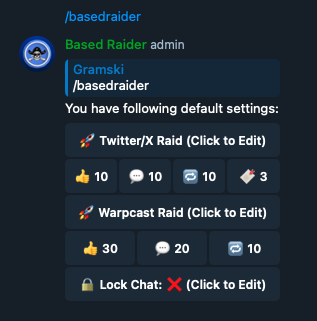
Enter /basedraider

<figure><img src="https://3004486480-files.gitbook.io/~/files/v0/b/gitbook-x-prod.appspot.com/o/spaces%2FC3LQoGoBvm3qG085j60B%2Fuploads%2FM72sB1cyOUUTUFjH5PAa%2F%3Abasedraider.png?alt=media&amp;token=c784deba-63b3-4a50-a506-0e58a19a8f18" alt=""><figcaption></figcaption></figure>

To edit Twitter/X presets, click on "Twitter/X Raid (click to Edit)"  button

To edit Warpcast, click on "Warpcast Raid (click to Edit)" button

<figure><img src="https://3004486480-files.gitbook.io/~/files/v0/b/gitbook-x-prod.appspot.com/o/spaces%2FC3LQoGoBvm3qG085j60B%2Fuploads%2FtOoVb9xvuIX7rXzigp7d%2Ftargets.png?alt=media&amp;token=cf6abc0b-8b0d-47d6-95d3-79fff6e5108f" alt=""><figcaption></figcaption></figure>

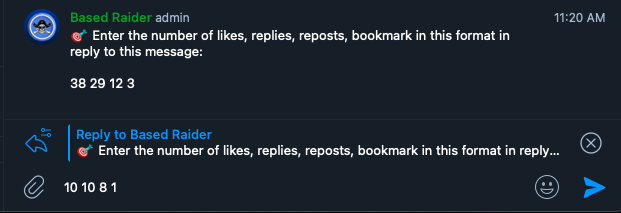
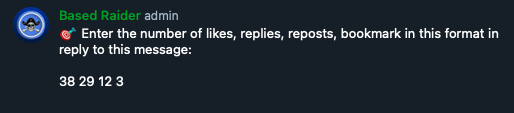
Enter the number of targets you desire in the required format.  Make sure to enter the targets as a reply message to the bot. &#x20;

<figure><img src="https://3004486480-files.gitbook.io/~/files/v0/b/gitbook-x-prod.appspot.com/o/spaces%2FC3LQoGoBvm3qG085j60B%2Fuploads%2Fw1cngGfiCg8tnsVcb7Al%2Freply.png?alt=media&amp;token=701037ad-65a0-4e38-a38f-7b74a96ab849" alt=""><figcaption></figcaption></figure>

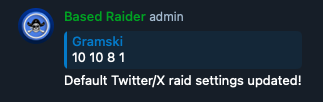
The preset targets have been updated.
<figure><img src="https://3004486480-files.gitbook.io/~/files/v0/b/gitbook-x-prod.appspot.com/o/spaces%2FC3LQoGoBvm3qG085j60B%2Fuploads%2FeZxQdxELmUpLBfUroNGB%2Fupdated.png?alt=media&amp;token=ed886e63-a7a0-44c7-bdeb-385aebe2602c" alt=""><figcaption></figcaption></figure>